
Login to your account!
Join the World's Largest Web App Marketplace!
Great to see you here!
Let’s set up your account in just a couple of steps.
Forgot password?
Enter your username or email to reset your account.
AnythingSlider EasyInstall Responsive jQueryPlugin
By : three17design Published On Monday, October 14, 2013, 17:48 In JavaScript

Slide Anything!
This is a jQuery plugin that enables the developer to simply call a jQuery function on any element. It will then grab each child within that element and integrate it into a customizable carousel. There are many different settings which are extremely easy to use. The settings are passed to the plugin in the HTML file when it is called.
If you like AnythingSlider, please leave a 5 star rating.  .
.
Features include:
- Super Easy Install
- Mobile-Ready Responsive Design
- Simple Customization
- Seven Different Transition Options
- Three Customizable Navigation Options
Navigation Button Options
There are several different button options for this plugin. Primarily you can choose to turn buttons on or off. If you have the buttons on, you can choose from ‘dots’, ‘lines’, or ‘numbers’. You can turn arrows on or off. It is also simple to customize the image used for arrows.

Transition Styles
There are currently seven different transition styles. They include:
- ‘scale-down’
- ‘slide-left’
- ‘slide-diagonal’
- ‘shuffle’
- ‘slide-up’
- ‘fade’
- ‘block’
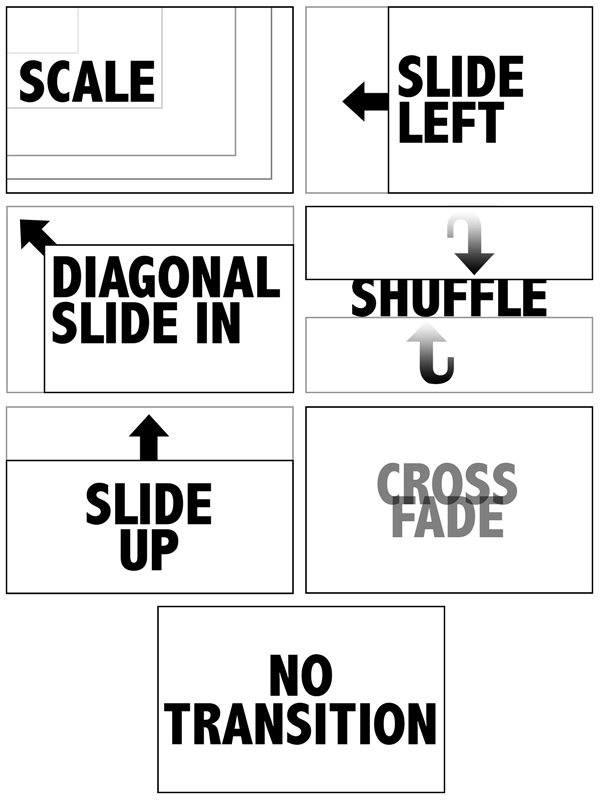
Mobile Ready
This plugin is prepared to re-size items within the carousel. So if you throw it into your responsive design, you don’t have to worry about it breaking it.
Simple Customization
If you’re wondering how easy it is to customize, let me show you. The code you insert into your page contains all the options. Here is an example:
$('#slide-me').carousel({
  style: 'scale-down',
  transitionSpeed: 'slow',
  carouselSpeed: 5000,
  arrows: false,
  buttons: true,
  buttonsTheme: 'lines',
  stopOnHover: false,
  carouselHeight: 'crop',
  carouselWidth: 'crop'
});
Support
Support is available for this plugin.
.


