
Login to your account!
Join the World's Largest Web App Marketplace!
Great to see you here!
Let’s set up your account in just a couple of steps.
Forgot password?
Enter your username or email to reset your account.
Compare Products with WooCommerce
By : bolderelements Published On Thursday, October 02, 2014, 17:04 In WordPress
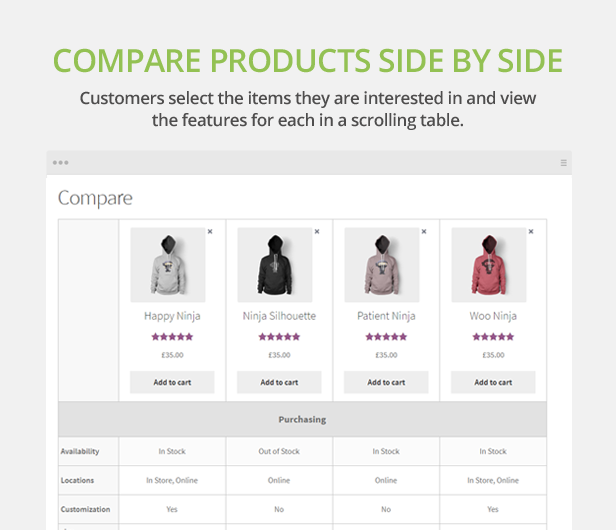
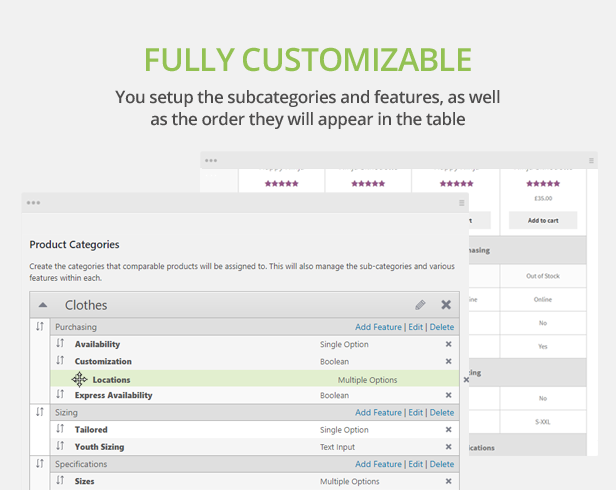
Add additional features to your products and compare them against other items side by side in a clean, organized table using the plugin Compare Products for WooCommerce. With an easy to use drag and drop interface, add, modify, or delete a category or product feature, all without leaving the settings page. Features can also be displayed in a separate tab on the products page, or any page for that matter using a shortcode.

- Custom define the categories and features in each table
- Custom define which compare group each product belongs in
- Drag and drop interface allows easy sorting
- Add, delete, and save without refreshing the page
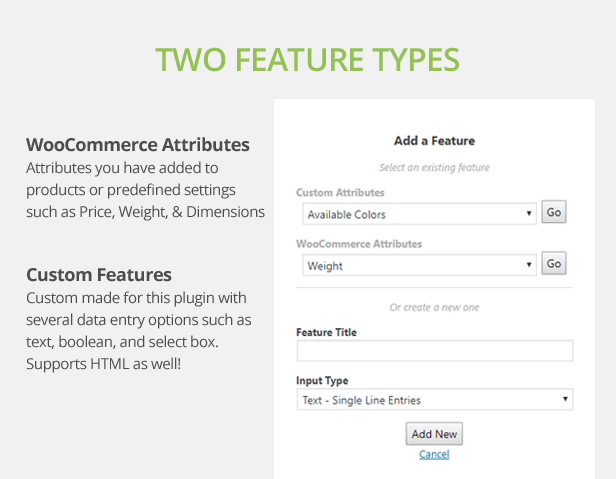
- Add the WooCommerce attributes you have already created, or a product specific settings such as:
- Price
- Weight
- Width
- Height
- Length
- Dimensions
- Stock Status
- Custom features as a secondary source of information with different input types including:
- Text (supports data HTML tags)
- Textarea (supports data HTML tags)
- Boolean
- Select
- Checkbox
- Change where the ‘Add to Compare’ checkbox appears
- Show a preview basket of selected items in a floating box at the bottom of the browser, or inline your webpage before or after the product list
- Show Compare Table on a page in your website or via popup window
- Option to show only the rows of the compare table with differences
- Responsive compare table enhanced for smaller devices or wider compare tables
- Widget to display selected compare items
- Display table horizontally or vertically
- Control how many items and their preview thumbnail size from the settings page
- Hide this ability on smaller devices
- Show list of feature as a tab on the single product page

2.1 - 2021-09-28
    - Added: Ability to share a comparison table via unique URL
    - Added: Toggle button to highlight different rows in the comparison table
    - Added: New shortcode for displaying the comparison button
    - Added: New options to select image size for basket and table
    - Added: Ability to hide empty row in Single Product "Features" tab
    - Enhanced: Session handler remembers if floating basket is open/closed between page loads
    - Enhanced: Prevent multiple compare buttons from being selected at the same time to prevent errors
    - Enhanced: Better handling when all items are removed while viewing comparison table
    - Enhanced: Added more classes to the comparison table for better CSS customization
    - Enhanced: Product images in comparison basket and table linkable to product
    - Enhanced: Organized settings page into sections
    - Enhanced: Various code changes to meet CodeCanyon standards and requirements
    - Fixed: jQuery error in the dashboard after WordPress 5.5 upgrade
    - Fixed: Widget display overriding basket content when clicking 'Remove All' button
    - Fixed: Error message not appearing in compare basket
    - Fixed: Checkbox unmarked when limit has been exceeded
    - Fixed: Attribute settings not appearing in the table when no custom features exist
    - Fixed: 'Remove All' link not working first time in widget basket
    - Fixed: Corrected a couple strings that could not be translated previously
    - Fixed: Featured Tab sorting problem on Single Products page
For a complete list of changes, view the full version log.


