
Login to your account!
Join the World's Largest Web App Marketplace!
Great to see you here!
Let’s set up your account in just a couple of steps.
Forgot password?
Enter your username or email to reset your account.
GChecker - SOFTPAE Google position checker app
By : izero Published On Monday, May 21, 2012, 14:49 In PHP Scripts

GChecker – Google keywords position checker – Easy to use keywords position checker with statistics, graphs, email reports and virtual cron!

The GChecker - Google position checker is an easy to use multiuser (e.g. for agencies) Google position checker script to automatically check positions of your website for your keywords in Google search results. This is a very complete script, very interesting tool for all SEO/SEM/Webdesign companies and agencies that want extend their services by this popular service/tool.
Forget all “unfinished” Google position checking scripts – this is a first fully complete Google position checking application for you.
Note: Installation service to your own server is also available for 15$ (Paypal payment)
Features included in GChecker – Google position checker:
- Easy to install and configure (read installation manual bellow)
- Absolutely new anti-blocking mechanism to prevent blocking from Google (from version 1.5)
- Unique Virtual Cron that is usable to run this script on servers without real cron
- Checking keywords in Google SERP, Domain checking
- Prepared for working in subfolder
- Advanced Users/Clients managements with Admin/Users groups
- Import keywords by list or csv file
- Export results to csv file
- Adjustable Google domain for checking, for all keywords or separately, one by one
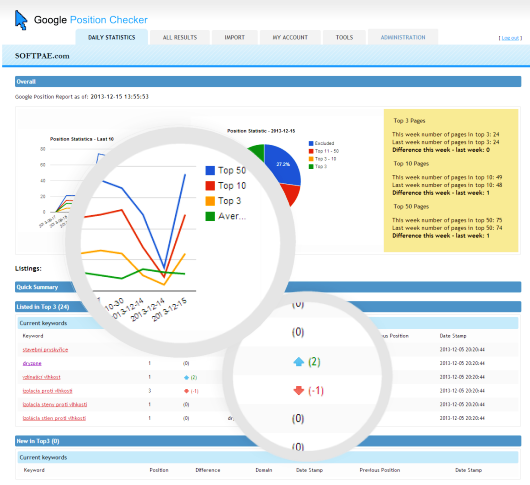
- Very nice statistics, graphs, summary for last 10 results
- Statistics for all keywords – includes, declines, top 3, top 10, top 50 positions, etc.
- Current and previous positions, differences, summary graph
- Configurable email reporting
- New XML/XSLT core (engine/templates)
- Easy to use tabbed interface
- Well coded, advanced programming techniques used
This is the tool you want to have!
NOTE: This script working almost perfectly, but there may occur some problems on some highly restricted web servers. Please read comments before you write your own comment with your problem. Common problems: If you get error with PDO, install PDO extension, if you get error with XSLTProcessor, install XSLT extenstion to PHP. (See requirements below).
Screenshot
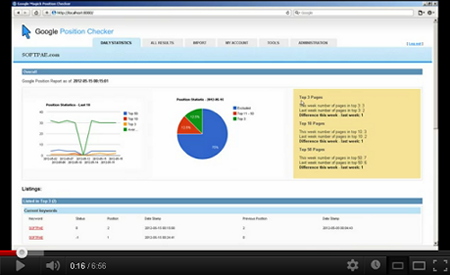
Video – See it in action
Live Demo
You can find demo site of GChecker at http://apps.softpae.com/gchecker/. (This demo is working since 2012.)
Importan notice: rename your install.php and upgrade.php file after installation to improve security.
Latest Updates
21.10.2017 - Version 1.6 - Major update
- fixed some errors
- highly improved compatibility with some more restricted/wrong configured web servers
- give us 5 * <img src="/images/smileys/wink.png" alt=";)" title=";)" />
06.01.2016 - Version 1.5 - Major update
- updated search query to work with latest Google SERP
- ABSOLUTELY new anti-blocking mechanist, theoretically undetectable by Google
- fixed some errors
- give us 5 * <img src="/images/smileys/wink.png" alt=";)" title=";)" />
15.12.2013 - Version 1.4 - Major update
- updated Google URL used to checking, https now used (http is not working anymore on Google)
- better results for all languages
- updated anti-blocking mechanism, better simulated users behaviour
- some visual enhancements (arrows)
- export results to csv file added
- ability to save snapshot of Google result page for all checked keywords
- updated logs
09.06.2013 - Version 1.3
- added user registration, no more admin login required, simple log in or create your new user account from login page
- added configuration variable for outgoing email address (gchecker sender)
- rate us by 5 * <img src="/images/smileys/wink.png" alt=";)" title=";)" />
10.09.2012 - Version 1.2
- fixed user reported errors
- fixed default google site setting while import
- improved application folder detection
- fixed other errors
- improved manual about how to properly setup system cron
27.05.2012 - Version 1.1
- improved UI
- option to specify Google site for checking keywords, now you can specify Google URL in your account settings for all keywords or one by one in import csv
- added function to check if you specify Google URL properly, default Google.com is used if not
- extended csv format for importing: keyword;site domain(optionally);google site URL(optionally)
- added configuration variable for DB tables prefix
- improved DB installation script + DB upgrade script added
- rewritten checking procedure by using XPath
- give us 5 * <img src="/images/smileys/wink.png" alt=";)" title=";)" />
21.05.2012 Version 1.0
- initial release
Requirements
- PHP5
- PHP CURL extension with SSL support enabled
- PHP XSLT extension enabled
- PHP PDO MYSQL extension enabled
- Optionally cron enabled/available
- Know how to upload files to your website (eg: with FTP)
- Optionally some HTML/CSS knowledge to style look & feel to your needs.
Installation and Configuration:
- Download and unzip the file from CodeCanyon
- Read manual (attached)

- Upload extracted files from Upload folder to your website (eg: to new /gchecker/ folder)
- Prepare (create) and empty MySQL database with appropriate user
- Set up user, database and cron informations in configuration file (/System/Plugins/configuration.php)
- Set write access rights to cronn, cront, check.txt and cron.txt files
- Run DB installation by opening http://yourwebsite.com/gchecker/install.php (replace yourwebsite.com with URL of your website)
- Set up cron to be keywords checked periodically (recommended, or optionally use virtual cron after log in on Tools tab)
To setup cron use this configuration:
”*/1 * * * * wget -q -O – http://yourwebsite.com/gchecker/System/Plugins/cron.php >> /dev/null 2>&1” - Open your GChecker page by going to http://yourwebsite.com/gchecker/ and log in by admin/admin (replace yourwebsite.com with URL of your website)
- Add new users/clients, configure account information, change password, update email, import your keywords etc. – see User Manual bellow
- Done!
See detailed installation informations in your downloaded zip file.
User Manual
    *** Administration ***
    **********************

    1. Log into Google Checker by your administrator username and password (default admin/admin)
    2. Go to Administration tab, setup standard user account for your client(s)
    3. If you do not use standard cron to periodically run checker engine, go to Tools tab and start virtual cron
    4. (You can use you administrator account like any other standard account - continue reading)

    *** Standard user - client ***
    ******************************

    1. Log into Google Position Checker by your username and password
    2. Go to Import tab and setup/import keywords you want check for positions
       You can import csv file with list of keywords and domain to checking or copy and paste this list to textarea, click "Import" to import it
       - one keyword + domain (optionally) per line, eg:
         seo analyzer;softpae.com - this will check position of domain "softpae.com" for keyword (phrase) "seo software"
       - or:
         seo analyzer - if you omit domain, the URL from your account setting will be used
    3. You can check your current/imported keywords/domains bellow the input form
    4. Wait while checking engine process keywords (check status of cron on Tools tab, 15 keywords every 20 min is checked)
    5. Go to Results tab to see detailed report for keywords, reload it occasionally while you don't see all results
    6. Go to Dashboard tab to see some interesting statistics and graphs
    7. At Account tab you can change your user settings (eg. email, URL of your base domain, password)
    8. Log out
The next step
You can extend this tool by using our SEOLyzer – Search Engine Optimization Analyzer!
Working on:
This script is incoming:
- GogooooSE MySQL Edition – true fulltext search engine script (SQLite3 version here)
- KISS CMS – An awesome CMS system based on our KISS MVC Framework (https://github.com/kissmvc/kissmvc
Live Demo
You can find demo site of GChecker at http://apps.softpae.com/gchecker/. (This demo is working since 2012.)
SOFTPAE.com
SOFTPAE.com is a small and very smart development company from Slovakia. We do website programming, search engine optimization, marketing, advertising for our clients.
Support:
If you want any customizations, contact us at magic (at) softpae.com.
Other things from us:
- SEOLyzer – Search Engine Optimization Analyzer Easy to use SEO Analyzer script with keyword density analysis and Google PageRank checking,
- FormFiller – universal PDF documents creation system, invoices, offers, resume etc.
- GogooooSE – Superior Fulltext Search Engine Script with spelling, keywords highlighting, boolean search and more,
- SuperSlide Accordion Menu v 1.0 – small, pure Javascript/CSS/HTML Accordion Menu
Rate us if you love this script :o) Thank you!


