
Login to your account!
Join the World's Largest Web App Marketplace!
Great to see you here!
Let’s set up your account in just a couple of steps.
Forgot password?
Enter your username or email to reset your account.

Google Maps WordPress Plugin to create easy, simple, responsive and styled maps! Please check the live demo to see map examples and map styles. The plugin allows multiple markers on each map and multiple maps in each page. A shortcode builder is included, together with 50 map colorful map styles. The shortcode is very easy to generate and the map is very easy to use. Now with the possibility to edit a previously created shortcode!
Usage
In a post, page or widget, write this shortcode to generate a map:[res_map address="your street, your city, your country" key="apikey"]or use the latitude/longitude coordinates:
[res_map address="-37.798391,145.01652" key="apikey"]
Features
- Shows address OR latitude/longitude
- 100% responsive
- Mobile-friendly
- Retina support
- Works in sidebars, posts, pages and custom post types
- Works with WPBakery
- Works with blocks
- Multiple markers
- Multiple maps in a page/post
- Real time map preview
- HTML popups
- Search box
- Clustering option
- Show/Hide the points of interest
- Custom link in the popups
- 50 included colorful styles or a hue color
- 10 included icons
- Your custom icons can be used
- Location button
- Controls on/off
- Directions link
- Street views
- W3C valid, does not break your W3C validation
- Minified resources (JS, CSS) for faster loading
- Translation ready
- Detailed documentation
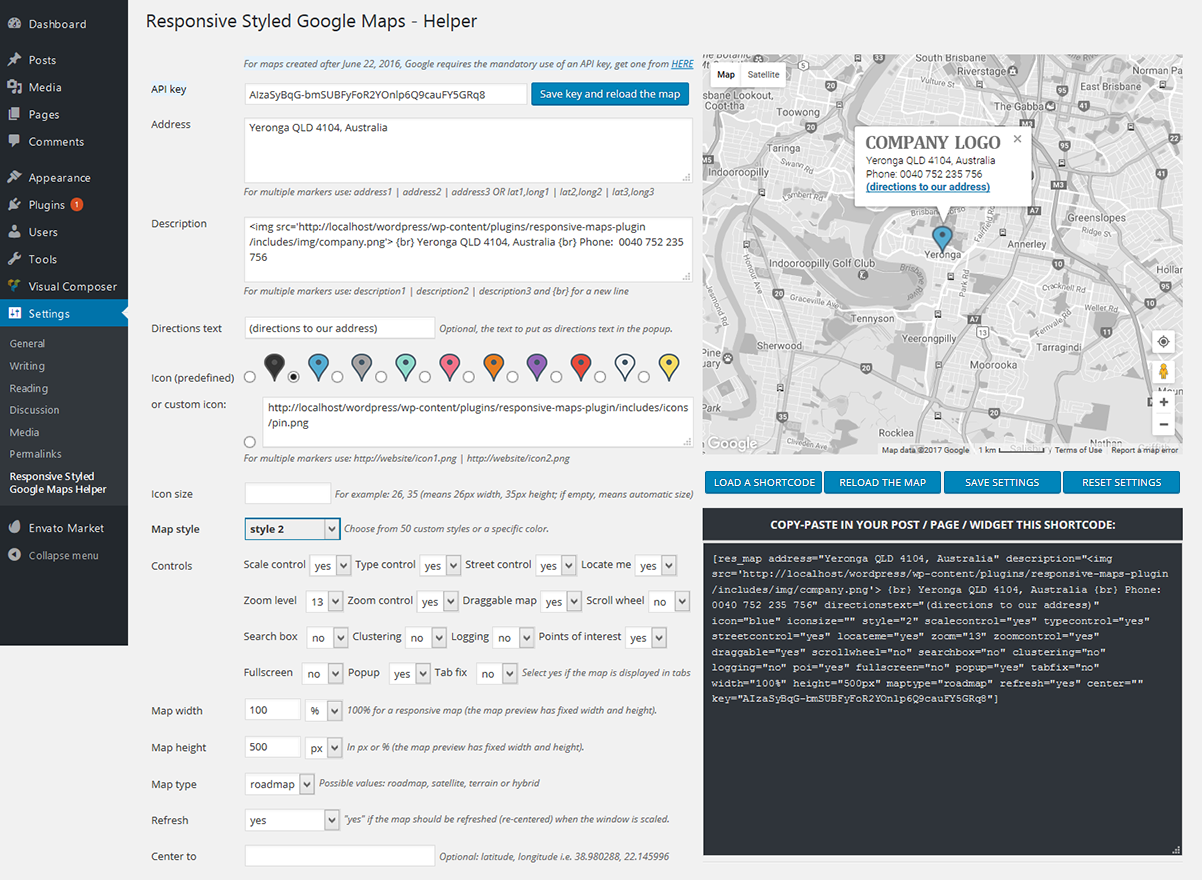
Plugin admin (click the image to view larger)
Themes using this plugin:
A great, beautiful theme using this map plugin: EternityA clean and fresh theme designed for kids related websites: Kids Zone
A modern and useful theme designed for tourism websites: Trendy Travel
A beautifully handcrafted responsive wedding WordPress theme: Lily
A theme muscled for modern trend, gyms, sport club or fitness centers: Fitness Zone
A theme for lawyers, attorneys: Attorney & Law | Lawyers WordPress Theme
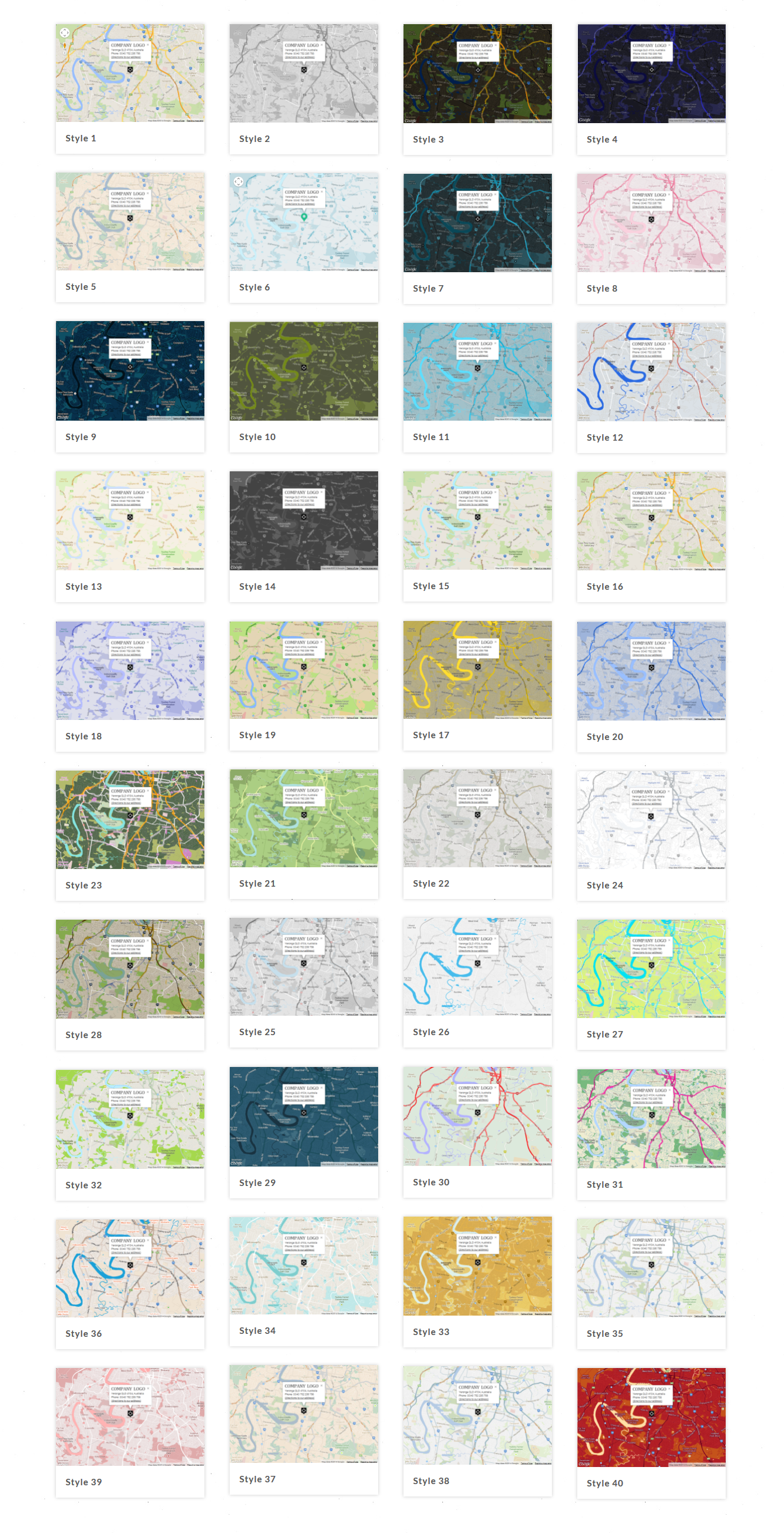
Map Styles
Credits
- Using the Google Maps API you agree to their Terms of Service
Documentation
http://yava.ro/wp-content/plugins/responsive-maps-plugin/documentation/index.htmlHow to upgrade from an older version
https://yava.ro/wp-content/plugins/responsive-maps-plugin/documentation/#upgrade-sectionVersion history
23.07.2021 - version 5.1
- Fixed the issue where markers are not centered when clicked from a list.

10.05.2020 - version 5.0
- Added in the back-end protection for the cases when Google Maps API libraries are included twice
- Updated the documentation

12.04.2020 - version 4.9
- Added jQuery support for themes which do not have jQuery support (like Twenty Twenty)
- Removed Envato Market class (not needed, updates are handled with separate Envato Market plugin)

17.12.2019 - version 4.8
- Fixed some CSS issues due to latest WordPress 5.3.1

12.05.2019 - version 4.7
- Fixed a compatibility issue with other plugins that are using also the "description" HTML field name.
- removed the "tab fix" attribute, no longer needed, it works in tabs without it
- fixed some bugs for the case when importing older shortcodes
- fixed the CSS margins of popup after the latest Google Maps API changes
- added to the documentation how to obtain the Google Maps API key
- replaced document.addEventListener("DOMContentLoaded") with jQuery(document).ready for better compatibility

04.01.2019 - version 4.6
- Included Envato Market Plugin for automatic updates.
- Fixed HTML warnings in PHP files.
- Fixed logo not showing in popup when RESET SETTINGS button was clicked.
- Replaced the "locate me" data image with a custom symbol (for https compatibility).
- Resized the "locate me" button to the size of the other controls.
- Converted all links from http to https.
- Added automatic delivery of retina icons on retina devices.
- Replaced style 50 with one that has countries boundaries.
- Optimized all images in the plugin package, for faster speed.
- Updated the language files.

12.07.2018 - version 4.5
- Fixed the responsiveness of markers popups on mobile.

20.10.2017 - version 4.4
- Now all the map settings can be saved in the database from the plugin's admin Helper window.

04.06.2017 - version 4.3
- CSS fix: now for all the elements inside the map div, the max-width is reset to "none" because Google Maps do not work with other max-width (some themes set max-width: 100%)

04.06.2017 - version 4.2
- Small updates to the documentation

05.05.2017 - version 4.1
- Fixed the CSS compatibility with CalendarizeIt plugin (which was breaking the google maps)
- Added the fullscreen button for desktops (for mobiles, Google adds it by default. Note: iOS doesn't support the fullscreen feature. The fullscreen control is therefore not visible on iOS devices. https://developers.google.com/maps/documentation/javascript/releases)
- Updated the marker clustering library to the latest version (https://github.com/googlemaps/js-marker-clusterer)
- Removed in CSS the fix for large rows of text in marker popup, now its already done by Google (white-space: pre-wrap !important;)
- Modified the responsiveness of the map to be done only at the end of the resize event (to prevent many requests to Google Maps server)
- Added if (jQuery('#mapcolor').length)  to the admin screen, to avoid the conflict with the CodeCanyon Frontend Builder plugin.
- Now the map scripts are enqueued right before the end of the body tag, to prevent conflicts with other plugins that were overriding the API
- Fixed the showing of incorrect center for slow internet connections.
- Added the button "LOAD A SHORTCODE" to be able to edit previously created shortcodes
- Added the tabfix parameter.

14.07.2016 - version 4.0
- Added a new shortcode parameter: iconsize (for retina support)
- Updated the translation file

...more in the plugin's documentation


