
Login to your account!
Join the World's Largest Web App Marketplace!
Great to see you here!
Let’s set up your account in just a couple of steps.
Forgot password?
Enter your username or email to reset your account.
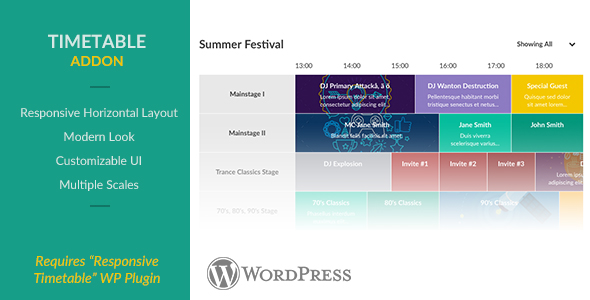


 Our horizontal addon provides a horizontal layout for the timetable. It supports all the features of the original layout, like a responsive modern interface, popups, image backgrounds, filters and much more. The layout it fully customisable and different scales are possible.
The horizontal layout is fully mobile compatible. You can also choose to show a list-view if the browser’s viewport is too small so the schedule remains clear for everyone.
Note: this is an addon To use this addon you need to purchase a license for the Responsive Timetable for Wordpress plugin, and have the plugin version 1.12+ installed and activated.
Addon Features
- Responsive Horizontal Layout
- All features of the original timetable
- Customisable UI
- Multiple Scales
- Mobile Friendly
Modern Flat Styling
 Timetables and events feature a modern and flat interface. All colors and styles can manually be changed. Select different colors for different events, or style all events the same.There are two different styling options: A single background color that changes darker/lighter/or custom color upon hover. Or a background color with a bar that fills upon hover. Both options just require a single color input, so it’s fast and easy to configure.
Select which data you want to display in the event box and tooltip. Choose between the event title, time and (short) description. Additionally you can truncate the title and description to fit into one line, or show them completely.

List View
 There is also a list layout. Choose to scale automatically into a list layout, or always have the timetable appear as a list using an option in the shortcode. The list layout looks very clear on mobile browsers and keeps your timetable organised on smaller screens. Of course there are many appearance and behaviour options for this layout in the admin panel, and features like filters still works great.
Event Time Slots
 (screenshot with event style 2)
To save time, it’s possible to assign multiple time slots and columns for each event. If you want to overrule other fields for your time slots (like the event color or description) you can, by making them editable fields for time slots. Your time slots then behave as events and copy all of their parent’s data, except the time, column and editable field(s).
Simultaneous Side-By-Side Events
 You can have 4 events happening simultaneously in the same column. Simultaneous events behave the same as normal events, they simply have a position setting. Simultaneous events can also include time slots.
Event Popups
 Clicking events will open event popups. Popups can feature an image or YouTube video, Custom Fields, and a full description. They’re completely responsive and mobile compatible, and are shown using a nice animation. It’s possible to disable the animations if you don’t want them, or only disable them for mobile browsers. The animations use CSS3 animations when possible to increase performance. You can also customize the styling of the popup like the text color, link color and background color.
Custom Fields
 Add custom fields to your events and use them to display the event time or location, but also show characteristics of the event like number of guests, a link to make reservations, show prices, etc. There are literary an unlimited number of possibilities. Custom fields can display one of 500+ icons and show 1 or 2 lines of text/html.
Additionally you can add dynamic text inside the custom fields like {column_title} or {start_time} which will automatically output the data.
Timetable Editor
 Managing your timetables and events is really easy using our built-in live editor. No more searching in tables or lists for your events, but see a live preview of your timetable while you’re editing it. Simply click on your events to edit them, and manage them in a simple to use interface. Hovering over events in the editor will show a tooltip to update the event using AJAX (not visible in screenshot). Use drag & drop to manage your columns and custom fields order. Additionally test how your timetable looks on smaller screens by changing the size of your browser while editing the timetable.
Feature List
- Responsive Mobile-Friendly Interface
- Simultaneous Side-By-Side Events
- Background Images For Events
- Timetable Shortcode Generator & Widget
- Hashtag Navigation with History
- Overrule options in the Shortcode and Widget
- 3 Different Timetable Scales
- Horizontal Layout Addon ($8
- Responsive Horizontal Layout
- All features of the original timetable
- Customisable UI
- Multiple Scales
- Mobile Friendly
- Event Boxes
- Color events individually, per column or per timetable
- Tooltips to show full title, time and/or description
- Automatically truncate title & description to fit into boxes
- Align text left, center or right
- Choose between 2 event box styles (view demo’s)
- Event Popups
- Popup Animations
- Responsive And Mobile Friendly
- Set a max-width
- Full HTML description
- Image or YouTube Video
- Autoplay YouTube Video
- Show custom fields in the popup
- Open Event Popup Via Link
- Custom link color
- Time Slots
- Give an event multiple time slots
- Time slots behave as normal events but copy the parent’s data
- Choose which fields should be copied and which should be editable per time slot (like description, color, etc)
- Easily manage time slots in the editor
- Custom fields
- Add unlimited custom fields
- Choose between 500+ icons, or show no icon
- Add 1 or 2 lines of text
- Dynamic custom fields: automatically use the custom field title, column title, event title, time, start time, end time
- Event Editor
- Responsive editor
- Live editor: see your changes realtime
- Timetable, column & event settings
- Sortable columns & custom fields
- Integrated into the Wordpress backend
- Easily duplicate events & timetables
- Import & export timetables
- Change Colors
- Easily change all of the colors with a color picker
- Reset colors to default
- Option to stack columns on smaller screens
- Add custom CSS
- Add custom CSS classes to events and columns to style them individually
- Time format
- Show sidebar left, right, both, or hidden
- Set background pattern colors
- Disable animations and/or tooltips for mobile browsers
Changelog
1.0.0 (August 8 2016)
* First version


