
Login to your account!
Join the World's Largest Web App Marketplace!
Great to see you here!
Let’s set up your account in just a couple of steps.
Forgot password?
Enter your username or email to reset your account.

WooCommerce ActiveCampaign by GetMogul is a WooCommerce extension that will allow you to add contacts to your ActiveCampaign account, with proper WooCommerce integration, and all the flexibility that you need to create targeted and personal automation campaigns.
Key Features
- Complete user tracking activities, from first visit, to order paid.
- Gather the important details from your users, like products purchased, total spent, or the contents of their last cart.
- Implement an effective cart recovery strategy, including a 2-step checkout process.
- Track any custom user interaction with your site, like clicks, amount of scroll, or time in page.
- Get in ActiveCampaign all the information and events needed to create targeted and personal automation campaigns.
Complete Tracking
Track everything that a visitor does in your WooCommerce store, including:
- When a WordPress user signs up.
- When a WooCommerce customer is added.
- When an order is processed.
- When an order is paid.
- Create or update a customer in ActiveCampaign.
- Add tags depending on the products in cart or order (product SKU/ID/name, product categories, product tags), and track the event. It supports product variations, for example “Blue Jeans (Size: M)”.
- Add contact fields and custom fields available, with important information about the customer, like address, currency, last order date, total spent, number of orders, or current cart information.
Unlike other plugins, this actions use the appropriate WooCommerce hooks and session, so they work even with AJAX events, or if the user is redirected after the event.
Now that you have all that information available in ActiveCampaign, you will be able to create Automations and send them targeted and personal emails or SMS.
This plugin will also insert the ActiveCampaign Site Tracking code in all pages of your site, and try to identify your visitors. This will allow you to know what pages are visited by your contacts and use it in Activecampaign Automations.

Cart Recovery System
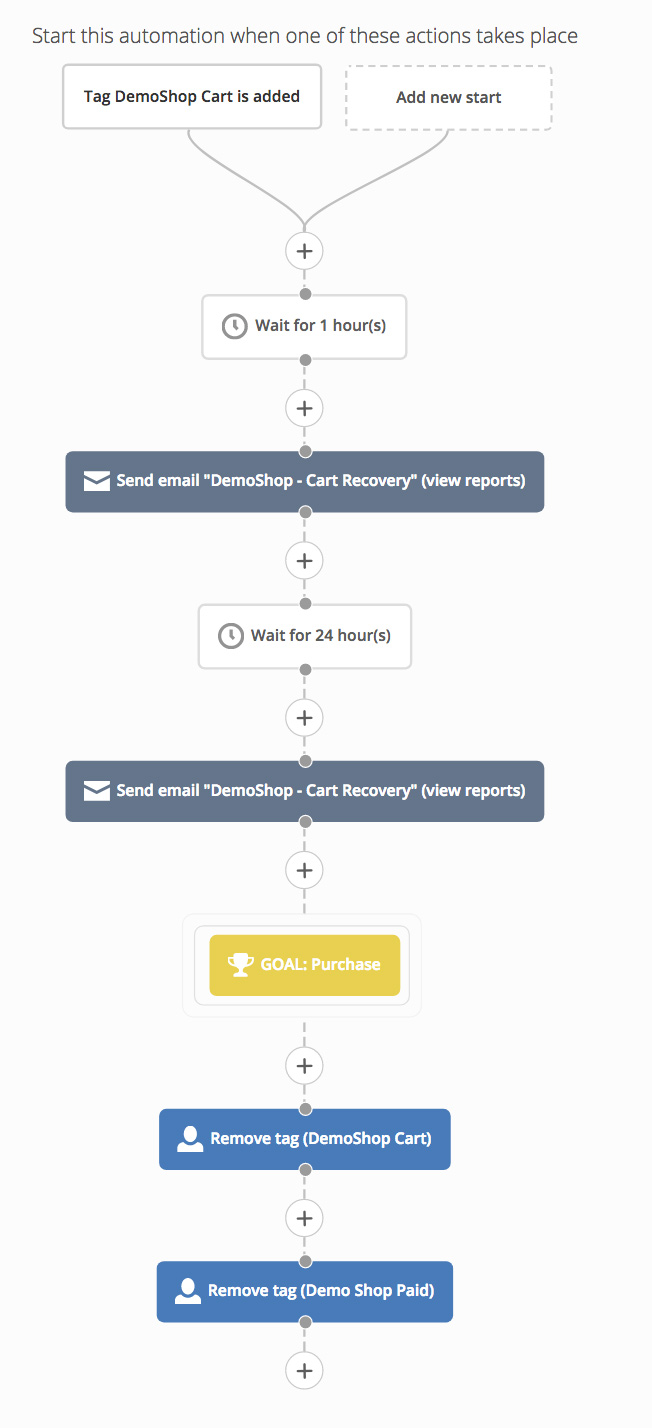
Did you know that the cart abandonment rate is about 70%? That’s why it is important to capture the customer email as soon as possible, and track their Add To Cart and Checkout actions to be able to follow up with them to recover some of those lost sales.
The Cart Recovery System includes a 2-Step Checkout option, that will change your checkout process to capture the customer email in step 1, and fill the rest of order information in step 2.
You can configure the 2 steps to be Tabbed or Headlines. Tabbed will put the 2 steps in 2 tabs on top. Headlines will put the 2 steps in 2 headlines one after the other.

Once the email is entered, it will be sent to ActiveCampaign. The contact created will get the cart tags and product tags (product SKU/ID/name, product categories, product tags), as well as this cart recovery custom fields:
- The cart contents: A text with the last cart contents. It can be configured with variable replacements. The default will be “Product A (x2), Product B (x3)”, but you could change it to: “2 x Product A, 3 x Product B”, or “Product A (2), Product B (3)”, or simply “Product A, Product B”.
- The cart recovery URL: When this URL is visited, the cart will be restored with the products in their last cart as it was when they left.
You can include this fields in the email that you send, to remind them what they were going to buy and continue where they left, even if they are in a different device.
If the email is from a current user, they will be able to enter their password and they will be logged in, and the checkout information prefilled with their details.
If the user is already logged in, or if we already know the visitor, it will track the cart interactions even before the checkout process starts: when the cart is updated (products are added, quantities changed, etc.), when the cart page is visited, and/or when the checkout page is visited.
If we know the visitor, for example, it is a current Contact in ActiveCampaign, we can give them a special link that contains their email or ActiveCampaign contact ID, so we will start tracking them as they arrive to the website, even if they are logged out.
Custom Event Tracking
Track specific actions of your visitors with multiple “and/or” conditions and dynamic values. For example, when a customer clicks a specific link, you can track an event with the value of the current cart total.
Some examples of triggers are:- When a page that contains a certain word is visited.
- When a checkout is successful and order is paid.
- When a product is added to cart.
- When an HTML element with a certain CSS class is clicked, mouseovered, or triggered any other JavaScript event.
- When an HTTP parameter with a certain name exists with a value that ends with a certain word.
- When the page is scrolled a certain amount of pixels.
- When the time in the page is more than a certain amount of seconds.
Advanced users can even use Regular Expressions to match the desired elements.
You can mix the conditions with “and/or” statements, for example: when a page that contains the word “blue” is visited, AND when the time in the page is more than 10 seconds.
When the conditions are met, you can set the event name and value to send to ActiveCampaign. You can enter a value directly, or use one of our dynamic replacements by entering variables like {{product_price}}, {{product_quantity}}, {{cart_shipping_tax}}, and many others. You can even add math equations between the {{}}. For example “{{(order_total – order_tax – 2) * .5}}”.
Note that after the event is sent to ActiveCampaign, you can add further actions by creating an ActiveCampaign Automation triggered by the event. For example you can create an Automation that adds a tag to a contact after the event is recorded.
As you can see this gives you all the flexibility to track your visitor actions and record them in ActiveCampaign.

Current Users Sync
If you already have some customers, you can sync them to ActiveCampaign with one click. They will be created with all the past orders information and settings as you have configured.
Multiple Stores Supported
You can select a default ActiveCampaign list where the contacts from your website will be added. The necessary custom fields will also be added only to this list. You can also use a prefix for all the tags and custom fields of this site. This allows you to keep your lists organized, and if you have multiple websites, the tags and custom fields from the different stores will not interfere with each other.
No Website Slow Down
Having a fast website will improve the user experience and it’s proven to increase conversion rates, and that’s why our plugin, unlike others, performs all the communications with ActiveCampaign in a background process that will not slow down the website when the users are interacting with them.
It Works with Any Plan
This plugin works with any ActiveCampaign plan, including the Lite Plan.
Other Features
- Loads resources only when active and needed, to ensure maximum site performance.
- Cacheable JavaScript and CSS files.
- Use of templates that could be overriden by custom plugins.
- Fully translatable.
- Works in multi-site networks.
- Works with WooCommerce 2.6 and superior.
- You can add your own Custom Fields and send extra data to ActiveCampaign using WordPress filters.
- Included 10% discount and free Custom Domain for all ActiveCampaign plans.
Changelog
# 1.7.9 2019-12-24
- Add missing file to packaged plugin

# 1.7.8 2019-12-23
- Remove ActiveCampaign API authorization from general initialization to improve site performance when ActiveCampaign servers are slow.

- Remove extra save changes button
# 1.7.7 2019-11-28
- Fix error when no session on checkout

# 1.7.6 2019-07-09
- Fix error when prefix is changed
- Update cron docs link

# 1.7.5 2019-05-31
- Fix error when transliteration functions are not installed as PHP module

# 1.7.4 2018-11-19
- Fix error when syncing customers with orders with deleted products
- Fix error parsing cart url in some installations
- Fix 2 step checkout adding twice to cart when using the add-to-cart link

# 1.7.3 2018-11-12
- Fix error if shutdown is called before init
- Remove OSX files from zip
- Fix error when empty session

# 1.7.2 2018-07-05
- Add text domains as string
- Fix session error when user is created from admin

# 1.7.1 2018-03-22
- Update ActiveCampaign API
- Lock dependencies versions
- Add timeout
- Fix error when cart empty
- When logging needed initiate it earlier

# 1.7.0 2018-01-09
- Check for order paid when the order is updated
- Make public contact_sync and event functions for developers

# 1.6.0 2017-10-30
- Show note in Sync Users button when syncing and page reloaded
- Add debug logging in browser
- Fix issue with custom fields not being created when updated
- Add custom field clarifications and reorder options
- Fix parameter email not being removed
- Fix logger not defined
- Add cart recovery tags when registering users if no empty
- Improve logging
- Add last checkout URL custom field
- Use Woocommerce rounding for numbers
- Add user roles tags option
- Send order processed tag even if the paid tag is enabled

# 1.5.0 2017-8-3
- Increase checkout steps priority to show before pay buttons from plugins
- Only show steps if user logged out
- Use hook for cron schedules
- Add api error notice
- Add note for cart recovery options and don't hide if 2-step checkout is enabled
- Don't send empty tags
- Make sure the cron is scheduled
- Prefix schedule interval, and support translation
- Use woocommerce function to get user orders
- Fix sync users not being scheduled
- Change syntax for older PHP versions
- Add missing translations
- Add background process reset button
- Move debug mode to constant

# 1.4.0 2017-6-30
- Add filters to create custom fields and pass custom parameters to contact sync requests
- Hide API credentials needed message in settings page

# 1.3.0 2017-6-14
- Add API credentials test
- Fix cron for multisite

# 1.2.0 2017-6-14
- Add link to documentation

# 1.1.1 2017-6-13
- Fix current url variable name for multisite

# 1.1.0 2017-6-13
- Add support for multisite

# 1.0.0 2017-5-29
- Initial release


