
Login to your account!
Join the World's Largest Web App Marketplace!
Great to see you here!
Let’s set up your account in just a couple of steps.
Forgot password?
Enter your username or email to reset your account.
Woo Brand and Model Plugin for WordPress
By : tawhidurrahmandear Published On Tuesday, October 09, 2018, 08:02 In WordPress

A WooCommerce PlugIn to add Brand & Model fields in Products
You must be interested to show the Brand and Model information in a different way that can attract everyone. This PlugIn will help you to do that. See the screenshots for a clear view
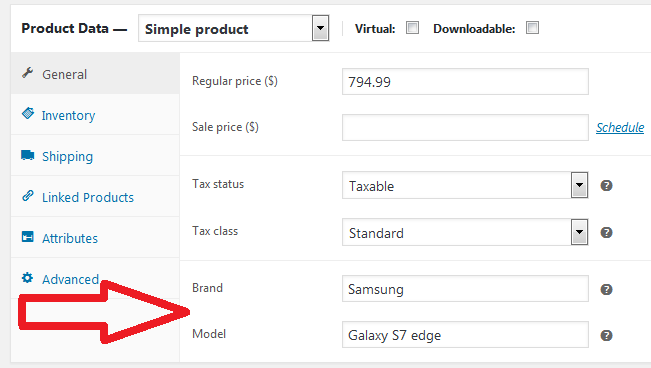
Screenshot of Back-End (Admin Panel)
Screenshot of Front-End (Website)

How to install?
-
It’s a WooCommerce Add-Ons, so activate WooCommerce first. then activate this PlugIn
-
Now Go to WordPress Dashboard > PlugIn > Select the PlugIn, and activate the PlugIn
Enter information from Product page
-
Go to ‘Products > Add product’, Or ‘Products > Products’ to edit any existing product
-
Find out ‘Product Data > General’. Just below Tax class, these two fields are shown
-
Fill these with Brand and Model information
-
See the output in Product Page Front-end
Why this PlugIn is special ?
- The PlugIn will automatically match with your Theme’s color, font, style. Visitor will think it as the part of your theme. If you use this PlugIn in different themes, you will feel the change
- Mobile Responsive
- The PlugIn takes very low space in hosting
- No coding knowledge or expertise required! You will not have to use any short-code.
Question?
Don’t hesitate to contact by email! Just go to profile page to send message
Happy?
If you feel satisfied, make the product author happy too. You are requested to
- leave a 5 star positive review
- follow Envato profile to get latest update
Thank you


